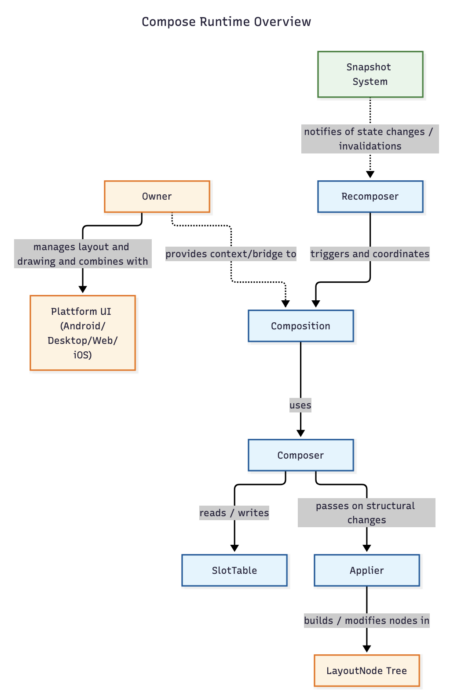
In my series about the inner workings of Jetpack Compose (or Compose Multiplatform), I repeatedly will mention certain parts of the runtime. While I will cover the most relevant parts in separate posts, I provide in this post a high-level view of things. It should help you understand the overall picture while my blog post series progresses, and most parts of it are not yet published.
So these are the interfaces/classes that I'm going to shortly describe in this post:
- Composition / CompositionImpl
- Recomposer
- Composer / GapComposer / LinkComposer
- Owner
- SlotTable
- Applier und LayoutNode
- The Snapshot System
Composition
The Composition is the manager of it all. It's the object that you create, to which you add an Applier and that holds onto the Composer and onto a CompositionContext.
It manages the lifecycle and state of the UI tree, combining your Composables with the runtime and ensuring that changes get applied.
Composition itself is an interface and CompositionImpl the internal implementation of it.
This object gets created for you when you use setContent() in your Actvity's onCreate() method1) - or on Compose Multiplatform it gets created within special extension classes ComposeUIViewController on iOS and ComposeWindow2) on Desktop.
A new Composition is created for every call of setContent(). So if you were combining the old view system with multiple fragments or ComposeViews and call setContent() on those, you might create multiple Composition objects as well as multiple Composers.
Recomposer
The Recomposer drives the composition loop. It holds onto a MonotonicFrameClock that actually issues events regularly.
When the Recomposer was notified of state changes by the Snapshot system, it triggers a recomposition on the next tick of its clock. So it drives the recomposition loop - but only if a recomposition is needed because of a prior state change.
The Recomposer is lifecycle aware and thus only triggers recompositions for as long as it's necessary. The Recomposer is a concrete class, no abstraction needed here.
Composer
The code that the Compose Compiler plugin generates interacts with the Composer interface.
The Composer is the runtime engine. It manages the node trees3) and plays a very important role in the optimization of recompositions.
The Composer holds onto the SlotTable and manages it. Important methods are the different higher level group handling methods like startRestartGroup() or the node handling methods startNode() and startReusableNode(). Its main purpose is to call the necessary group- and slot-handling methods on the SlotTable. It also takes care of what I would call slot-pointer handling.
Even though you can get access to the current composer using currentComposer() within your Composable, if you do so all odds are off. That's because most methods move the slot-pointer - even something as seemingly innocuous as checking for changes with the method changed(someVar). The docs are pretty clear about that, but who reads the docs? So, be very careful - and better leave the Composer to the runtime only.
The Composer is an interface, the actual work is done by one of the two implementation classes GapComposer or LinkComposer.4)
Owner
The Owner is the bridge to the underlying OS specific system - in Android that's the old view based system. Android still creates a View that is placed on the screen using setContentView() - even if you never calls this method in any Activity yourself. And of course the same is true with JFrame on desktop or UIViewController on iOS.
This bridge gets events from outside (e.g. when it needs to layout or invalidate) and also any interaction with accessibility services is done via the Owner. I really think the Owner is an underrated part of the Compose runtime and definitely will deal with it in two separate posts.
For iOS and Desktop OwnerImpl is the concrete implementation of the Owner interface. For Android it is AndroidComposeView - the very outmost view that is created and added to the View tree, when you call setContent().
SlotTable
In Compose the SlotTable is basically an in-memory cache for your UI. It consists of groups and slots. A group is a meta structure that defines how many slots belong to this group, what kind of group it is and so on. Furthermore groups form a tree. Groups point to the data (slots) that belong to them.
A Slot simply is any kind of data - it's just a place in an array of type Any?. One example of data held are LayoutNode objects. Or all the parameter values of your composables (to be later able to compare them with new parameters on recomposition). That's why its type must be Any?.
The Composer makes heavy use of the SlotTable. It creates objects here if necessary (on initial composition or, if things have changed, on recomposition) and decides which parts to skip for performance reasons during recompositions based on cached data and optimizations the compiler has already been able to make.
For performance reasons groups are held in a flat array of int values, and slots are held in a flat array of Any? - meaning really that any kind of data might live in them.
Applier
The Applier is necessary for node handling within compose. Every Composable creates a node that is added to the Applier. How this is handled will be explained in detail in a different post. The Applier manages the nodes and the relationship between them.
For every Composition a applier is created. In Compose it is normally a UiApplier object that is useful for ui-related nodes. Note that on iOS and Desktop a common DefaultUiApplier is used. UiApplier as well as DefaultUiApplier deal with LayoutNodes.
But even within Jetpack Compose there exists with VectorApplier which handles VNodes a different one used for vector drawables.
Also you are not limited to Jetpack Compose. Glance uses a different applier and Jake Wharton created Mosaik for terminal based UI which uses a MosaicNodeApplier.
So the applier is always tied to the type of node you want to use. Since an applier gets passed to the constructor of Composition your composition is also tied to this type of nodes.
The Snapshot System
Whenever you use mutableStateOf() or something like this in your code, you indirectly deal with the snapshot system of Compose. As the name implies for certain parts of your UI Snapshots are created to represent the current state. These are represented by the interface Snapshot.
When you create a State object by using mutableStateOf() the returned object implements StateObject, which holds onto a list of StateRecords. These hold the values that are relevant for a certain point of time. Interested observers register itself to be notified when Snapshots are committed - that's how the Recomposer learns of these changes.
Interested in More?
As mentioned in the introduction this is the high-level overview. I will deal with many of these classes or concepts in later posts. Until then, refer to this overview whenever you want to understand the relationship of the relevant parts.
Until then: Happy coding!5)
Footnotes
| ↑1 | Internally the ComponentActivity uses the setContent() method of the ComposeView. |
|---|---|
| ↑2 | ComposeWindow extends JFrame. |
| ↑3 | Compose has two kind of trees (see the sections on SlotTable and Applier in this post) |
| ↑4 | I probably won't go into why two implementations exist in my series. For a detailed breakdown read this post that explains why LinkComposer was introduced. |
| ↑5 | Or whatever you want to call your activity nowadays, given that AI does lots of our coding. |
