"Two colleagues of mine asked me how Compose actually works. That's why I started digging into this to get a clearer picture of it.
Compose's main building blocks
To understand Compose properly, you need to know both main building blocks of it:
- The Compose Compiler Plugin
- The Compose Runtime
Of course, these themselves consist of many more parts. But for now it simply helps to separate these two parts.
In this post I dig into the Compose Compiler Plugin and will describe many relevant parts. In future posts I will cover a lot of ground of the Compose runtime. But the compiler creates the basis for the runtime to work on. So let's see what the Compose compiler plugin does.1)
The Compose compiler plugin changes the code of your Composables. This allows for a lot of optimizations, as you will see later.
To understand the Compose compiler plugin, you need to know a bit of background first. Especially what the frontend and the backend are in relation to compilers.
Compiler Stages
A compiler is usually separated into multiple phases - which might be grouped into different stages. Wikipedia speaks of three common stages, but Kotlin's K22) uses two stages (after all, it's not directly generating machine code):
- Frontend
- Backend
A compiler frontend has insofar to do with user-facing things - something we app or web devs normally consider to be the frontend - that it starts with the user's source code. It takes the source, then analyzes it, checks it for any errors, and breaks it down into an intermediate representation (in Kotlin's case the FIR). Frontend in this case means: it's the first stage.3)
The compiler backend works then on the intermediate representation and uses it to generate the desired compiler output (e.g. machine code, byte code and so on). Backend thus means that it's the last stage, which in itself consists of multiple phases.
Any K2 compiler plugin can plug into both stages - and the Compose compiler plugin does so. I will cover the details of both stages further down.
To make things a tiny bit more confusing, there's a frontend intermediate representation (FIR) and an intermediate representation (IR). As the name implies, the FIR is used in the frontend while the IR is used in the backend.
Use the source, Luke 4)
The source of truth for all things in this post is the Kotlin repository on Github, which contains the Kotlin compiler and the plugins maintained by Jetbrains. When you open the Kotlin repo with IntelliJ, you hopefully have sufficient memory around since the repo is huge.
With Kotlin 2.0 the sources for the Compose compiler plugin moved from Google's Android repository to Jetbrains Kotlin repository - and with it the juggling with the Compose, Kotlin and Compose compiler plugin versions in your gradle files so that they actually worked together is a thing of the past. Gladly so!
The Kotlin compiler itself is in the compiler module.5)
K2's Frontend API
The compiler module contains many submodules - one of which is the plugin-api, which defines the API for frontend plugins. This API is surprisingly small:
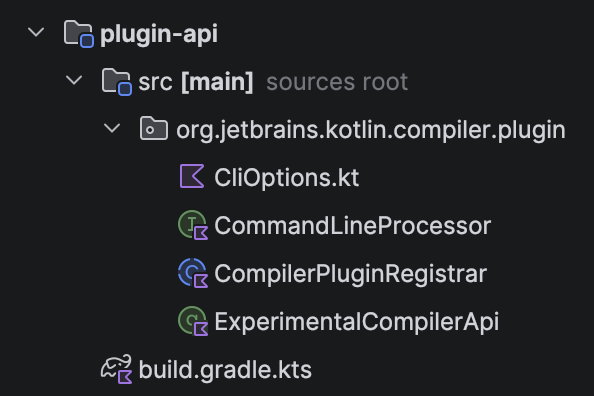
The two important ones here are
CommandLineProcessorCompilerPluginRegistrar
CommandLineProcessor
The CommandLineProcessor is an interface you have to implement to specify which command line options your plugin consumes and how to do so. A bit simplified, the interface looks like this:
interface CommandLineProcessor {
    val pluginId: String
    val pluginOptions: Collection

    @Throws(CliOptionProcessingException::class)
    fun processOption(option: AbstractCliOption, value: String, configuration: CompilerConfiguration) {}

    // a few other extension methods not relevant here...
}
CompilerPluginRegistrar
The CompilerPluginRegistrar is an abstract class. So your plugin has to override it. Mainly it boils down to setting the id of the plugin and implementing one method to register your extension:
// ...
abstract val pluginId: String
abstract fun ExtensionStorage.registerExtensions(configuration: CompilerConfiguration)
// ...
The ExtensionStorage is an inner class of CompilerPluginRegistrar that stores registered extensions.
K2's Backend API
For the backend, you need to use different extension points. Those are defined in the backend.common module (folder backend):
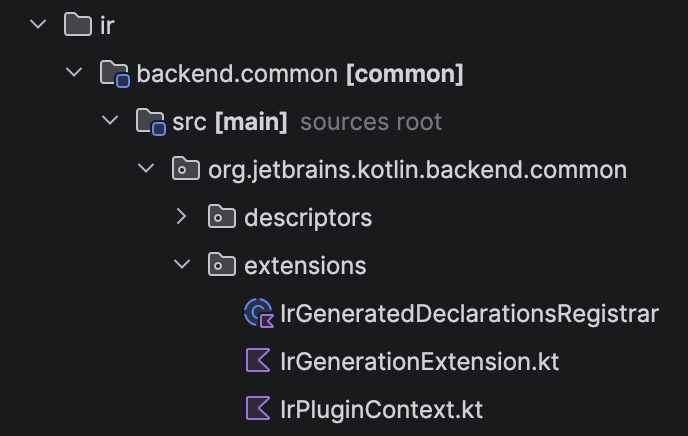
The main important part here is the IrGenerationExtension.
IrGenerationExtension
The interface IrGenerationExtension declares among other things one method that concrete classes must implement: generate(). That's the method to generate the IR or manipulate an existing IR.
interface IrGenerationExtension {
    // ...
    fun generate(moduleFragment: IrModuleFragment, pluginContext: IrPluginContext)
    // ...
}
The backend plugin's implementations of this interface are also registered in the ExtensionStorage mentioned in the frontend part.
Compiler Plugins
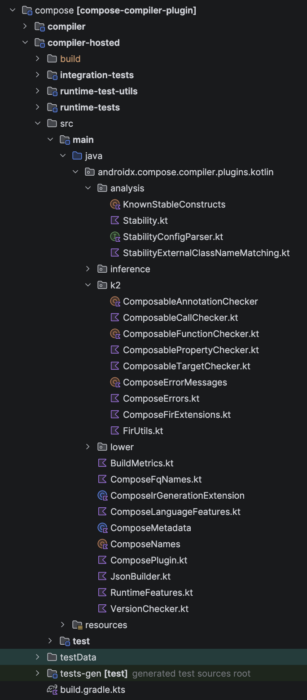
The compiler plugins are in the top-level plugins folder, and the Compose compiler plugin is the compose-compiler-plugin module (note: the folder is simply named compose). It contains some sub-modules, of which for us compiler-hosted is the only relevant one:
The Compose Compiler Plugin's Frontend
The frontend of the Kotlin compiler does a lot of stuff, as you can see in the next picture.
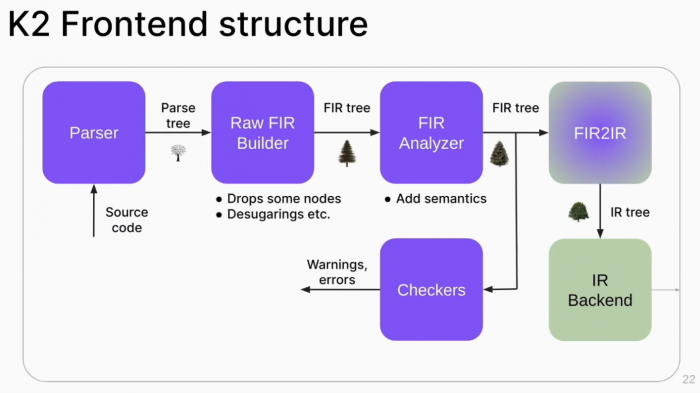
Basically the frontend ensures that you follow the rules of the language. And since Compose adds rules on top of the Kotlin rules, it has to plug into the frontend to ensure that those rules are followed by your code.
The Compose compiler plugin does not do that much in the frontend. It's mostly located in the box on the picture that says "Checkers" since the plugin's frontend parts need to verify the correct behaviour of your Composables.
For example, a Composable is only allowed to be called from within another Composable. The Kotlin compiler should fail if you miss doing so, but the stock Kotlin compiler cannot do so, since it doesn't know anything about Composables in the first place. It's only the plugin that knows of it and thus has to enforce it. That's what - among other things - the ComposableCallChecker does.
Or your Composable could override a function that is not a Composable. That's a conflicting override which the Kotlin compiler cannot detect on itself, and thus the plugin needs to find out about this. This check is done in ComposableFunctionChecker. The same checker checks also that if an expect is marked as a Composable than your actual should also be a Composable.
These are just some examples - all in all 22 possible error conditions are checked by the plugin.6) For more details, take a look at the classes in the package k2.
One common part: FIR2IR
As outlined in the picture above and as you will see in the next picture in the section about the backend, both stages have a common phase that marks the handoff from frontend to backend: the FIR2IR phase.
The frontend works only with the frontend intermediate representation. The backend works only with the intermediate representation.
In this handoff phase the FIR is transformed into the IR so that the backend can do its job.
The Compose Compiler Plugin's Backend
The backend of the Kotlin compiler lowers in each phase the IR closer to the low-level target that the result should be (e.g. bytecode). Plugins during the backend stage simply work on the IR and change it in any way they see fit.
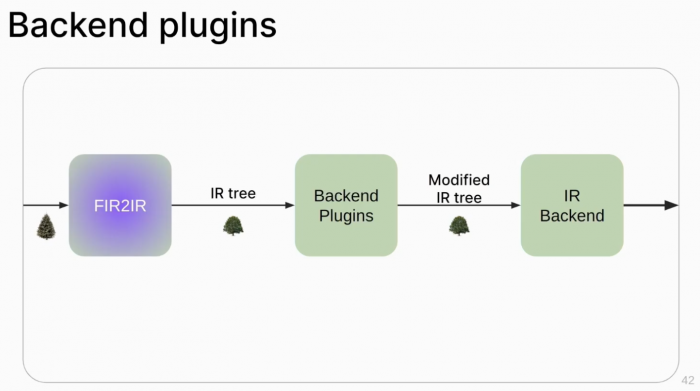
You can see in the image above that the plugins run in the backend pipeline before the actual lowering happens. That means before the IR is converted into the target output.
Since the frontend only ensures the code is emantically correct, any code generation has to happen in the backend - and this is what the Compose compiler plugin's backend part mostly does.
It takes your Composable and enhances it - not unlike how the normal Kotlin Compiler transforms suspend functions' bytecode.
The Compose compiler plugin has exactly one IrGenerationExtension, the ComposeIrGenerationExtension.
But this one extension calls many other classes to lower specific aspects of the code - which are all in the package androidx.compose.compiler.plugins.kotlin.lower. Take a look at this package on github for details. I'm not going to name all the classes and their role, nor do I pretend to even know and understand all of them.
To be honest: The code is quite difficult to read since at this point it's dealing with the intermediate representation (IR) and therefore I recommend using the fantastic tool Decomposer.7) You can read more about Decomposer and the motivation for Baiqin Wang to create this tool.
I will use Decomposer a lot here to show you how the Compose compiler plugin modifies the code of your Composables.
I will cover those things here, which to me are the most interesting and relevant parts of the changes done by the compiler.
- Parameter list changes
- Composer
- Changed
- Default
- Group handling
- Optimizations
So let's dig into these, starting with the changes of the parameter list and what the added parameters do. All compiler changes have to do with optimization, and they contribute to this ominous emitting of UI that in the context of Jetpack Compose is so often spoken of.
I will use this simple Composable to explain the parameters:
@Composable
fun VerySimpleComposable(name: String = "World") {
    Text(name)
}
Parameter list changes
When the Compose compiler plugin backend does its work, one important change is to add three parameters: $composer, $changed and $default, as you can see by the next snippet:
@Composable
@ComposableTarget("androidx.compose.ui.UiComposable")
fun VerySimpleComposable(
  name: String?,
  $composer: Composer?,
  $changed: Int,
  $default: Int
) {
    // ...
}
The first change to notice is that the parameter name is suddenly a nullable String instead of a non-nullable.
Then three more parameters were added: $composer, $changed and $default.
The $composer is needed to interact with the runtime bridge, the Composer - an interface of the runtime. See my overview of the components of the Compose runtime for the relationships of the runtime components.
The $changed parameter is used to track changes - and that's what we will dig into a bit further down.
The $default parameter is used to track default parameters - because for Compose the normal compiler handling of default parameters is not appropriate. This is covered in the next but one section. Both $changed as well as $default are essential parameters of your changed Composable to be able to determine whether some sections need to be recomposed or not.
$omposer
The Composer is, as the Android documentation states "the interface that is targeted by the Compose Kotlin compiler plugin". That is, whenever your changed Composable needs to interact with the Compose runtime, it always uses this interface to do so.
If you look at the changed code of the above Composable after the Compose compiler plugin has done its work you will notice many usages of this interface:8)
@Composable
@ComposableTarget("androidx.compose.ui.UiComposable")
@FunctionKeyMeta(/* ... */)
fun VerySimpleComposable(
  name: String?,
  $composer: Composer?,
  $changed: Int,
  $default: Int
) {
  run {
    $composer = $composer.startRestartGroup(-624197321)
    sourceInformation($composer, "C(VerySimpleComposable)N(name)21@514L10:VerySimpleComposable.kt#cqvpe8")
  }
  val $dirty: Int = $changed
  if ((($default and 1) != 0)) {
    $dirty = ($dirty or 6)
  } else if ((($changed and 6) == 0)) {
    $dirty = ($dirty or if ($composer.changed(name)) {
      4
    } else {
      2
    })
  }
  if ($composer.shouldExecute((($dirty and 3) != 2), ($dirty and 1))) {
    run {
      if ((($default and 1) != 0)) {
        name = "World"
      }
      if (isTraceInProgress()) {
        traceEventStart(
          -624197321,
          $dirty,
          -1,
          "com.decomposer.sample.talk.VerySimpleComposable (VerySimpleComposable.kt:20)"
        )
      }
      Text(
        name,
        $composer,
        (14 and $dirty),
        0,
        262142
      )
      if (isTraceInProgress()) {
        traceEventEnd()
      }
    }
  } else {
    $composer.skipToGroupEnd()
  }
  run {
    run {
      val tmp0_safe_receiver: ScopeUpdateScope? = $composer.endRestartGroup()
      if ((tmp0_safe_receiver == null)) {
        null
      } else {
        tmp0_safe_receiver.updateScope { $composer: Composer?, $force: Int ->
          return VerySimpleComposable(
            name,
            $composer,
            updateChangedFlags(($changed or 1)),
            $default
          )
        }
      }
    }
  }
}
We break this down into smaller parts in the next sections.
At the beginning a restartable group is started, and at the end it is ended. We also see a call to $composer.changed() to check if a parameter has changed or the call to shouldExcecute(). I will cover both calls in the section about the $changed parameter.
That's it for today about the Composer. A full post about it will be coming in the near future. To see how the Composer fits into the overall runtime, see my high-level sketch of the Compose runtime.
Parameter bitmasks
For the sections on $default and $changed you need to know that the compiler uses a bunch of bit flags, all grouped into three bits for each parameter.
The meaning of those three bit slots is as follows:
| Slot | Meaning |
|---|---|
000 |
Uncertain. The compiler cannot infer it. |
001 |
Same. It has the same value as in the last call. |
010 |
Different. It has a different value than in the last call. |
011 |
Static. It's always the same value. |
100 |
Unknown. According to the code unused. Admittedly, I'm not sure why it's there in the first place. |
$changed9) passes in an integer with the triplets preset by what the compiler can already decide on the call site. If, for example, you call the Text Composable with the fixed string "Hello World!" it would know that this is a static value and would set the bits accordingly to 011.
In the code that the compiler generates, a new variable is created called $dirty that also deals with these triplets. Initially it is set to the same value as $changed, but is modified later on in the code to check for every parameter of the original Composable the corresponding triplet.
Mapping an arbitrary int value to a specific triplet is not easy for our mind, which is why, if you click on an int in Decomposer, it transforms it show the slots for this value. It also helps you see the triplets and which triplet the 3072 in the shown screenshot actually is. E.g.:
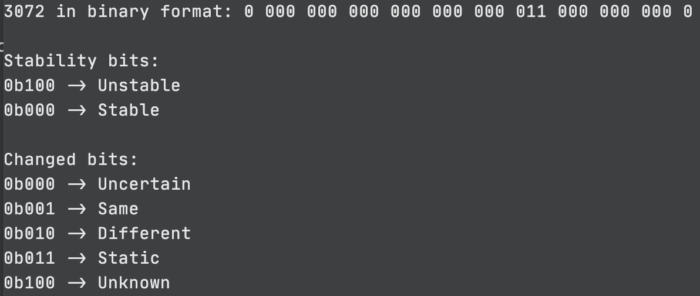
Keep in mind, the lowest bit of the $changed value is not part of these triplets. If this bit is set, the function needs to be recomposed, no matter the value of $changed or $default. But this means that the values for the single triplet of our Composable all need to be multiplied with two since they are shifted one position to the left. For example for our triplet 001 would be compared to 2 or 011 to 6.
The $default parameter's usage
While in the order of parameters last, the $default parameter is easier to understand; that's why I cover it before $changed.
There are two sections of code where the parameter comes into play.
The first one is to set the triplet for the specific parameter to static if it is a default value:
  val $dirty: Int = $changed
  if ((($default and 1) != 0)) {
    $dirty = ($dirty or 6)
  } else if ((($changed and 6) == 0)) {
    // ...
This means if the parameter is using the default value, the respective triplet for this parameter is set to static.
A bit later in the generated code we see this snippet:
  if ((($default and 1) != 0)) {
    name = "World"
  }
It simply uses the default value here and sets it for the parameter in question. That's needed since the normal Kotlin compiler default handling isn't used. For the Kotlin compiler Composable functions do not have default parameters when the Compose compiler plugin has done its work, since the transformed code no longer has default values!
So $default was easy, right? Now let's have a look at the more complicated sibling $changed.
The $changed parameter's usage
This is the most interesting one of the three added parameters. It tracks for each parameter in the original list of your Composable's parameters if it is a static parameter, if it has changed, or whether the compiler cannot infer if it has changed or not.
If, for example, you call a Text Composable with a fixed string, the compiler can infer that this is a static parameter - and will never change. This means if this Text Composable has been composed once and no other parameter changes, the runtime does not have to actually call the Composable again but can simply reuse the cached result for this Composable.
This is basically this part:
  val $dirty: Int = $changed
  if ((($default and 1) != 0)) {
    $dirty = ($dirty or 6)
  } else if ((($changed and 6) == 0)) {
    $dirty = ($dirty or if ($composer.changed(name)) {
      4
    } else {
      2
    })
  }
  if ($composer.shouldExecute((($dirty and 3) != 2), ($dirty and 1))) {
    // compose initially or recompose after change
  }
    // skip recomposition
  }
So what does the code above do? First in line four it compares it with the value for a static parameter. It uses the or operator to combine the old value of changed (that was passed into the function because it might know more about it from the call site) with the result of the $composer.changed() check. If the composer decides that the value has changed compared to its stored value in the SlotTable it sets the second bit of this triplet to 1. Otherwise it sets the first bit.
Now in line 11 the decision to (re)compose is taken by the Composer, based on one boolean and one int. The boolean says whether the parameters changed. This weird comparison only checks if the first bit of the relevant triplet is set. That would mean the code above has decided that this is either a "static" value or has the "same" value. $dirty and 1 compares if the "force recomposition" flag was set to 1 and passes this bit value on as an int.
The inner block gets executed when either the force recomposition flag is set or if the first bits of all the relevant triplets for all parameters of the function are not set. There is a bit more to it, but that's the gist of it.
One important thing is the $composer.changed() call. There are many overloads for it, with all the primitives plus one for stable objects. But in case we deal with an unstable object here, it doesn't use the changed(Any?) overload, but the changedInstance(Any?) overload. The difference is that the latter returns true whenever it's a different object, whereas in the case of the former, it returns true when the value is different.
Invalidation
One interesting bit is that when a Composable gets invalidated and needs to be executed again, the call at the end of our modified Composable is used:
val tmp0_safe_receiver: ScopeUpdateScope? = $composer.endRestartGroup()
if ((tmp0_safe_receiver == null)) {
    null
} else {
    tmp0_safe_receiver.updateScope { $composer: Composer?, $force: Int ->
        return VerySimpleComposable(
            name,
            $composer,
        updateChangedFlags(($changed or 1)),
        $default
        )
    }
}
We see in the highlighted lines a call to our composable based on the original values $changed and $default.
But $changed is modified by setting the "force recomposition" flag to 1.
And finally sets the function updateChangedFlags() all bits for all parameters to at least "same" since the code calls this composable with the same values as before.
The call site
To see the difference in how the Composable gets called depending on the call site. Let's look at this usage sample of our VerySimpleComposable:
@Composable
fun VerySimpleComposablScreen(name: String) {
    Column {
        VerySimpleComposable(name)
        VerySimpleComposable("Bob")
        VerySimpleComposable()
        Box {
            // do nothing
        }
    }
}
As you can see, we have one call site, where the code simply passes the parameter name of the screen further down to our Composable. In the second one we have a fixed string we pass further down, and finally one where we do not pass anything to our Composable.
And this is what the relevant code of these three calls of VerySimpleComposable looks like after the compiler plugin did its work:
VerySimpleComposable(
    name,
    $composer,
    (14 and $dirty),
    0
)
VerySimpleComposable(
    "Bob",
    $composer,
    6,
    0
)
VerySimpleComposable(
    $composer,
    0,
    1
)
The interesting parts, obviously, are the parameters $changed and $default - the last two in the calls above.
$default on the call site
Let's start with the simpler one, the $default parameter. As you can see, it simply passes in 0 for when it is no default value and 1 when it is using the default value. That's what made the code shown in the $default section above choose to use the text "World".
Being a default value also makes this a static value. Whenever this third Composable gets recomposed, it will produce the same result. And that's precisely why the Compose compiler needs to know about default values. Relying on the normal handling of the Kotlin compiler wouldn't work. We wouldn't know that we deal with a static value here and can skip recomposition for this Composable.
With Compose's own handling of default values, the compiler does know about it, and the generated code can thus decide to skip recomposition, since we already have everything we need in the SlotTable10).
$changed on the call site
Luckily $changed on the call site is quite easy to grasp compared to its usage in the generated code within the Composables.
In the first call to VerySimpleComposable we pass on the value from outside the call site itself. So the screen already gets a name from outside and has already checked if it is a static, a changed or the same value. In line 4 it simply passes this information on (14 simply sets all three bits of the respective triplet) to the called composable.
In the second call we set a fixed value "Bob". Thus the triplet passed on is set to static.
And in the last call, we use the default parameter. We do not need to pass any specific value for our triplet; the called Composable sets it to static anyway.
Conclusion
Of course there is more to it if Composables get more complicated. For example, with lists like LazyColumn each element is wrapped in a calls to$composer.startReplaceGroup() and to $composer.endReplaceGroup() which create a different type of Group to the one mentioned above.
With samples using Modifiers you would see that they do not get changed. Or with a Composable containing a remember{} block you would see how they are wrapped in a group and cached by the composer. All in all, I strongly recommend playing around with Decomposer. It's really a very helpful tool!
Having said this, I hope this post was useful to you. Happy coding!
Footnotes
| ↑1 | Since Kotlin 2.0.0 the Compose Compiler Plugin is part of the Kotlin repository and as such will always be compatible with the compiler you use. Prior to that you had to make sure that your compiler plugin and Kotlin compiler versions were compatible. |
|---|---|
| ↑2 | K2 is the compiler architecture that's used from Kotlin 2.0 onwards. You could already use it optionally a bit before that. For the JVM - and indirectly thus for Android - it was in beta from Kotlin 1.9 onwards. The older compiler was different, and as such, the Compose Compile rplugin as well. No need to tell about the old way any more, though. |
| ↑3 | The frontend of any UI technology normally calls the backend and presents those results in one form or another back to the user in the frontend. With compilers it's really more one stage after another. So the backend, in the context of compilers, is simply the second stage after the frontend is done with its work. |
| ↑4 | https://wiki.c2.com/?UseTheSourceLuke |
| ↑5 | There is this great post on the general workings of the Kotlin compiler, that might be a good background to what's coming next in this post. And even for digging deeper, there's always the source. While I strongly recommend Kartik's post about the compiler, digging into the compiler's source is not necessary to understand Compose's compiler plugin. |
| ↑6 | Well, to be honest: I simply counted the number of error messages in ComposeErrorMessages 😀 |
| ↑7 | Sadly, it looks like it's no longer maintained. Too bad. First, a switch to Kotlin 2.4 would be nice, or searching in the code window to quickly find the Composable in questions. Baiqin Wang, if you read this, please let's have a chat! Until then I am working on a forked version of Decomposer to work with newer Kotlin versions. |
| ↑8 | Note: Decomposer currently produces a slightly different output, since it uses the Compose compiler plugin that was part of Kotlin 2.1. I have used a forked and updated version, which is not yet quite ready to be published, to create the version above. As noted in the previous footnote: Baiqin Wang, if you read this, please let's have a chat! |
| ↑9 | In case you have too many parameters for one integer, you will see additional changed variables named $change1 and so forth. Since we have three bits per slot and the lowest bit of the 32 available bits per integer is reserved for a different meaning, we can fit ten argument slot into one integer. Meaning, with 11 params you see and additional $changed1, with 21 and additional $changed2" and so on. |
| ↑10 | See my post that gives an overview of the Compose runtime and a quick description of the part the SlotTable plays inside of the runtime. |
