Android offers you the possibility to easily format text with HTML markup. Thus it's easy to create text like this:
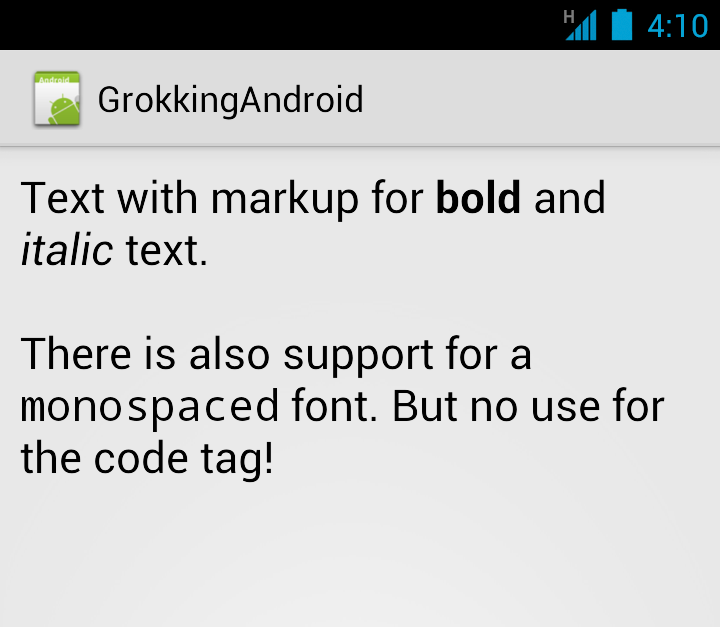
You probably are going to use bold or italics the most, but there are many more supported.
Here is the list of all supported tags. You can find it in the source of android.text.Html's inner class HtmlToSpannedConverter:
| Tags | Format |
|---|---|
| b, strong | Bold |
| i, em, cite, dfn | Italics |
| u | Underline |
| sub | Subtext |
| sup | Supertext |
| big | Big |
| small | Small |
| tt | Monospace |
| h1 ... h6 | Headlines |
| img | Image |
| font | Font face and color |
| blockquote | For longer quotes |
| a | Link |
| div, p | Paragraph |
| br | Linefeed |
Formatting text from your strings.xml
If you want to support text formatting from within your strings.xml file, you have to escape the tags - or use a CDATA section (thanks to Jose Miguel for pointing this out). Otherwise Android simply ignores them when reading the resource file.
To escape the tags you just need to replace all "<" characters. Luckily you do not have to escape the ">" characters as well. That way the HTML structure is still at least kind of readable. But only kind of.
If you use many HTML tags a CDATA section is better. For the sample above it looks like this:
      <![CDATA[

Text with markup for bold
      and italic text.

There is also support for a
      teletype-style font.
      But no use for the code
      tag!
      ]]>
Even if you can add a lot of HTML tags, you are better off using only minor styling as mixing too much styles makes your text look uneasy instead of being more striking.
The following snippet shows how to use this string from within your Java code:
TextView view = (TextView)findViewById(R.id.sampleText);
String formattedText = getString(R.string.htmlFormattedText);
Spanned result = Html.fromHtml(formattedText);
view.setText(result);
Alternatives to consider
For longer texts that use HTML tags, I recommend to use raw files instead.
For more complicated formatting a WebView probably would be better.
