Whenever you need to access the People or Calendar app and want to add contacts or events you need an account. On the emulator though no account exists by default. So in this blog entry I am going to show you how to add your Google account to your emulator.
For existing accounts the method in this post still works. For new accounts that’s no longer the case. Should I find a solution for new accounts, I will update this post.
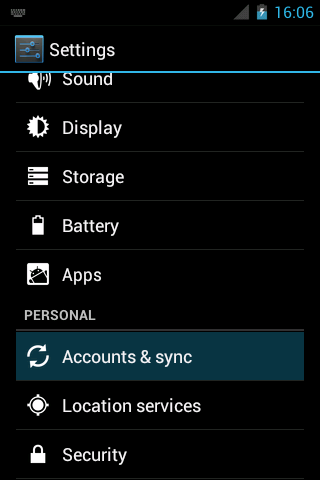
First of all you have to go to the settings and select “Accounts & sync”:
You see the list of accounts – which in the emulator should be emtpy:
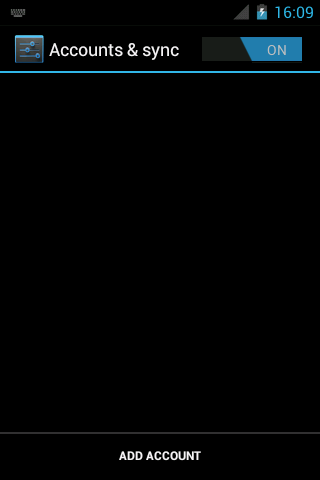
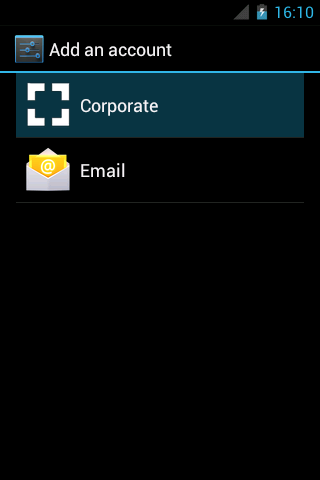
After you have clicked on “Add account” you will see the selection of sync providers available. In the emulator the following two should be listed. The first one is the Exchange sync adapter, the second one is for email only. So you should select the “Corporate” type:
In the next step you have to enter your Google-account credentials as usual:
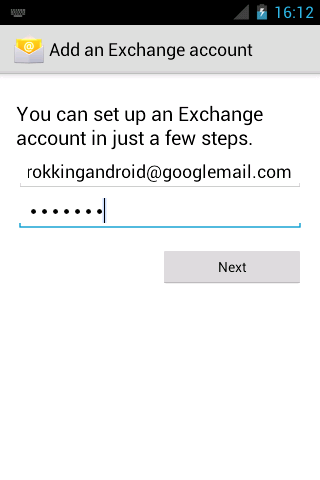
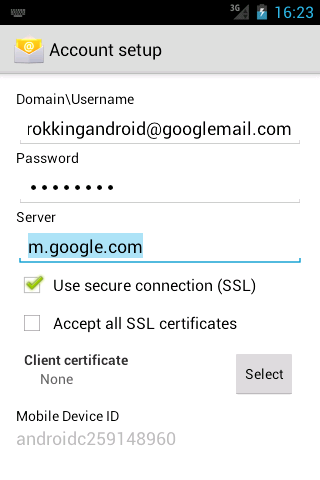
The next step is not that straightforward. To use your Google account as an Exchange account you first have to change the presented domain username to your email-address again. Android by default chooses another name based on the mail-address you entered before. But this default domain name does not work here.
You also have to change the server to “m.google.com“:
Now if you hit “Next” you are nearly done. You might want to check if the correct check marks are set, but the defaults should normally suit you well.
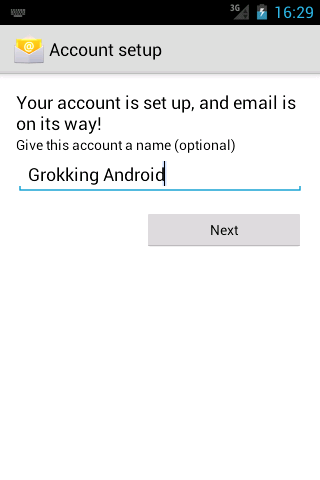
In the last step you can change the name of this account and after hitting “Next” once again, you are done.
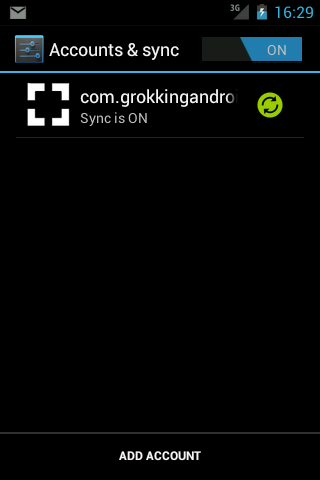
Your newly created account is now listed in “Accounts & sync” screen and the initial synchronization has already been started. If you have mails or appointments you should notice notifications popping up soon. And your contacts and events should show up in the respecting apps.
From now on you can use the Calendar app to create and edit events on your device and have them synced with your account.
If you have any other suggestions that might help or tips on how to improve development on Android, please let me know in the comments section.


I'm Wolfram Rittmeyer, a software-developer from Germany.
Thank you, thank you, thank you! This really made my day!
I still wonder why it was disabled to register a Google account the normal way. It was possible in earlier SDK versions. One could even access the market like on a regular phone!
Using the emulator to debug and test apps that use PIM data is almost impossible without a Google Account registration!
(Makes me wonder if they simply forgot about this workaround
)
Glad, I could be of help. Are you sure about the market? I’m using the emulator for two years now and I think I have never seen it.
Yes, I am sure. When I first started with the Android SDK I was using Cupcake 1.5. (must have been SDK 3 or 4). I just bought a Samsung Galaxy i7500 and used the SPare Parts app on my phone. I then wanted to try some of those features on the emulator and installed it simply using the market after simply registering the emulator with my Google account, just like I did with my actual phone.
I cannot find the original SDK 3 or 4 anymore. Simply setting up an emulator targeting those SDK’s won’t work
(PS., Sorry for my late response)
I don’t have the “Accounts & sync” option under the Settings menu.
I have an “Add Account” option under “Accounts”, but it doesn’t works. Nothing happens when I tap on it.
I am using the latest ADT Bundle SDK.
Are there any other options to add my Google account to my emulator?
thnx in advance
Thanks 10^6!!! I can’t believe how long it took to find this article. There are dozens, perhaps hundreds of posts all over the net asking this question and not one of them contains the complete and straightforward information presented here. How you ever figured this out is beyond me, but I’m glad you did.
This also seems to work with much earlier version of Android and you don’t have to install the Google APIs. Why doesn’t Google support their own bloody system?
Hi, Thanks a lot. It worked charm.
Hi,
I don’t have the “Accounts & sync” option under the Settings menu.
I have an “Add Account” option under “Accounts”, but it doesn’t works. Nothing happens when I tap on it.
I am using the latest ADT Bundle SDK.
Are there any other options to add my Google account to my emulator?
hi beni, i m also going through a same issue as of your’s.did you find any solution to this..if any.? kindly help me out.
Thanks a lot.. m.google.com is useful information.. now i am able to access my gmail account in AVD emulator
Thanks, and Bundle of thanks…….
Your tutorial was very helpful and I solve my problem after 4 days because of your good work… Thanks again, Nice work.
thanks
I’ve followed the steps above to try and sync my gmail calendar on my ICS emulator in Eclipse. I see my gmail account in Accounts and Sync – Sync is ON but when I open up the Calendar in my emulator, I cannot see my gmail calendar. Neither can I add events as there is no calendar on the emulator.
My emulator is set up for Android 4.0 API 14
Any ideas please?
Thanks!
Update to my previous. After a restart of my emulator (classic), I can now see my gmail account in the ‘Calendars to display’ and I can add an event on my emulator yay! BUT, how come events are not synced between my emulator calendar app and my gmail calendar? If I’m not mistaken, I thought they were meant to sync?
Thanks!
I was able to get this to work a month or so ago on an enulator running API 15, but I’ve been trying for the last couple of days on emulators running on API 16 without any luck at all. I get either of the foolowing error messages:
1) If I use “myaddr@googlemail.com”, I get the error message: “Username or password incorrect”
2) If I use “myaddr@gmail.com”, I get the error message: “You don’t have permission to sync with this server. Contact your server’s administrator for more information.”
Any ideas what could be going wrong here? Is there a different way to approach this? I really need to get my contacts into the emulator for testing purposes!
By the way, in the API 16 version, there is a new “Port” field which is set to 443 by default (when SSL is checking).
Please reply back in case you a get solution to your problem. I am facing the same issue.
Thanks
For new accounts Google no longer supports the Exchange protocol ActiveSync. For existing accounts everything should still work.
Should I find a new way for new accounts I will update my post.
Hi, Every one … I am trying to send automatic email from my application with out UI… Can you help me in that…. I find lot of code Javamail but that not works here…. i am using emulator 4.0…